Timing, profiling and compiling#
Timing#
import numpy as np
import time
rng = np.random.default_rng(3945)
A straightforward way to time code is to read the current time with time.time(). For example, consider the following matrix multiplication:
n = 10**3
A = rng.normal(size = (n,n))

t_start = time.time()
B = A@A
t_end = time.time()

print('Time taken = ', t_end-t_start)
print('GFLOPS = ', 2*n**3 / (t_end-t_start) / 1e9)
Time taken =  0.015881776809692383
GFLOPS =  125.93049404770841
As well as the time taken, this also outputs the number of floating point operations per second (in units of \(10^9\) FLOPS or GFLOPS). I’ve used the fact that for each element of the new matrix we have to do \(n\) multiplications and \(\approx n\) additions, so we expect the total number of operations to be \(2n^3\).
%%timeit -n 3 -r 10
# -n gives the number of times to run for each time measurement
# -r is the number of times to repeat the time measurement
B = A@A
12.3 ms ± 1.45 ms per loop (mean ± std. dev. of 10 runs, 3 loops each)
Tip
Question Does the number of GFLOPS we obtain here make sense? What should it be? How does it depend on \(N\)?
Profiling#
import matplotlib.pyplot as plt
import scipy.integrate
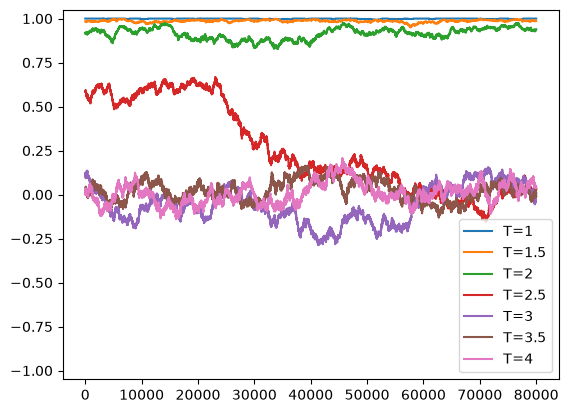
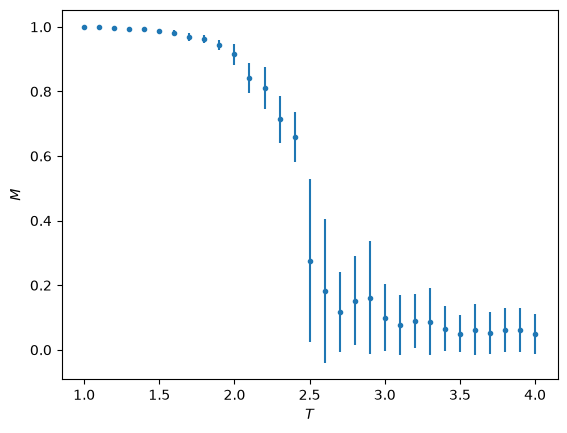
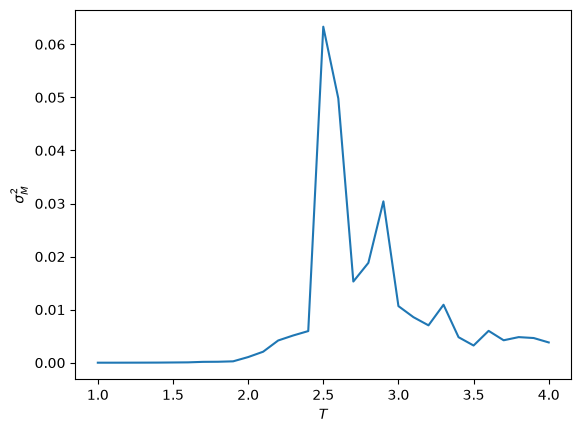
We can also look in more detail at which parts of the code take the most time. This is known as profiling. As an example, let’s take a look at the code from the homework solutions that solves the Ising model.
def run_ising(beta):

    N = 30
    Nspins = N*N
    ntrials = 10**5

    # Populate the array with random spins (+1 or -1)
    #spins = -1 + rng.integers(2, size = Nspins) * 2
    spins = np.ones(Nspins)

    M = np.zeros(ntrials)
    M[0] = np.sum(spins)/Nspins  # starting point

    # Compute the random numbers to use for accepting the jump in advance
    u = rng.uniform(size=ntrials)

    for i in range(ntrials-1):

        # Choose spin at random
        j = rng.integers(Nspins)

        # Compute energy change if this spin were to flip
        delta_E = 2*spins[j] * (spins[j-1] + spins[(j+1) % Nspins] + spins[j-N] + spins[(j+N) % Nspins])

        # Attempt flip
        if u[i] <= np.exp(-beta*delta_E):
            spins[j] = -spins[j]

        # Store magnetization
        M[i+1] = np.sum(spins)/Nspins

    # remove the first 20% (burn in)
    return M[int(ntrials/5):]
def run_ising_optimized(beta):

    N = 30
    Nspins = N*N
    ntrials = 10**5

    # Populate the array with random spins (+1 or -1)
    #spins = -1 + rng.integers(2, size = Nspins) * 2
    spins = np.ones(Nspins)

    M = np.zeros(ntrials)
    M[0] = np.sum(spins)/Nspins  # starting point

    # Compute the random numbers to use for accepting the jump in advance
    u = rng.uniform(size=ntrials)
    jvals = rng.integers(Nspins, size=ntrials)

    for i in range(ntrials-1):

        # Choose spin at random
        #j = rng.integers(Nspins)
        j = jvals[i]

        # Compute energy change if this spin were to flip
        delta_E = 2*spins[j] * (spins[j-1] + spins[(j+1) % Nspins] + spins[j-N] + spins[(j+N) % Nspins])

        # Attempt flip
        if u[i] <= np.exp(-beta*delta_E):
            spins[j] = -spins[j]
            M[i+1] = M[i] + 2*spins[j]/Nspins
        else:
            M[i+1] = M[i]

        # Store magnetization
        #M[i+1] = np.sum(spins)/Nspins

    # remove the first 20% (burn in)
    return M[int(ntrials/5):]
%%prun -q
# remove the -q above to generate output
# in class we used the profiling output to optimize--
# compare run_ising with run_ising_optimized
# with a factor of 3 speed up

T_vals = np.arange(1.0,4.05,0.1)

M_vals = np.zeros_like(T_vals)
chi_vals = np.zeros_like(T_vals)

for i, T in enumerate(T_vals):
    M = run_ising(1/T)
    M_vals[i] = np.mean(np.abs(M))
    chi_vals[i] = np.var(M)

    if (abs(np.floor(T*2)-(T*2))<1e-5):
        print("T = ", T)
        t = np.arange(len(M))
        plt.plot(t, M, label = "T=%g" % (T,))

plt.ylim((-1.05,1.05))
plt.legend()
plt.show()

plt.clf()
plt.errorbar(T_vals, M_vals, np.sqrt(chi_vals), fmt='.')
plt.ylabel(r'$M$')
plt.xlabel(r'$T$')
plt.show()

plt.clf()
plt.plot(T_vals, chi_vals)
plt.ylabel(r'$\sigma_M^2$')
plt.xlabel(r'$T$')
plt.show()
T = 1.0
T = 1.5000000000000004
T = 2.000000000000001
T = 2.5000000000000013
T = 3.0000000000000018
T = 3.500000000000002
T = 4.000000000000003
Keeping track of memory#
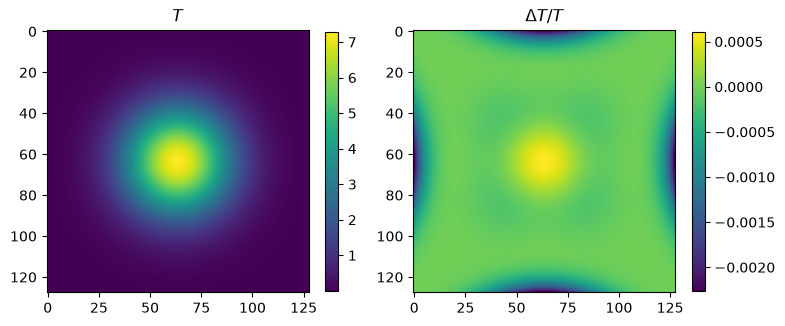
As an example, here is the code we used for 2D diffusion. We can use tracemalloc to look at the memory usage.
# MBs needed for 128x128 array of doubles
128*128*8/1e6
0.131072
import tracemalloc

tracemalloc.start()


def construct_matrices(n, alpha):
    # This is the matrix for the explicit update on the RHS
    AR = np.diag((1-alpha)*np.ones(n)) + np.diag(alpha/2*np.ones(n-1),k=1) + np.diag(alpha/2*np.ones(n-1),k=-1)

    # and for the implicit update on the LHS
    b = 1 + alpha*np.ones(n)
    a = -alpha/2*np.ones(n)
    a[0] = 0
    c = -alpha/2*np.ones(n)
    c[-1] = 0
    AL = np.vstack((a,b,c))

    return AL, AR

def gaussian(x, y, x0, t):
    # Green's function for the diffusion equation
    dx = x-x0[0]
    dy = y-x0[1]
    return np.exp(-(dx**2 + dy**2)/(4*t)) / (4*np.pi*t)

# set up the grid and initial condition
n = 128
T = np.zeros((n,n))
x = np.linspace(0,1,n)
dx = x[1]-x[0]
xx, yy = np.meshgrid(x, x)
x0 = (0.5, 0.5)   # location of the gaussian
t0 = 0.001   # initial time
T = gaussian(xx, yy, x0, t0)

# timesteps
alpha = 2
nsteps = 80
dt = alpha * dx**2
AL, AR = construct_matrices(n, alpha)

%matplotlib
image = plt.imshow(T)
plt.title("%d: t=%lg" % (0,t0))
plt.colorbar()
plt.show()

Tnew = np.zeros_like(T)
B = np.zeros_like(T)

# We take twice as many steps here because we are doing half-timesteps
for i in range(2*nsteps):

    # Compute the right-hand side matrix row by row
    for j in range(n):
        B[j,:] = AR @ T[j,:]

    # and now solve column by column for the new T
    for j in range(n):
        Tnew[:,j] = scipy.linalg.solve_banded((1,1), AL, B[:,j])

    # take the transpose to swap directions for the next half-step
    T = Tnew.T

    if i%2 == 1:
        ti = t0 + dt*(1 + i//2)
        #plt.clf()
        #plt.imshow(T)
        #plt.title("%d: t=%lg" % (1 + i//2,ti))
        #plt.colorbar()
        #plt.show()
        #plt.pause(1e-3)

        # in class we changed the plotting to the following:
        image.set_data(T)
        plt.draw()
        plt.pause(1e-3)
        # rather than make a new plot each step, we modify the plot data

    if i%10 == 0:
        current, peak = tracemalloc.get_traced_memory()
        print("Step ", i, ": current/peak memory usage is", current / 10**6, " ", peak/10**6, "MB")

# compare the result with the analytic one
ti = t0 + dt*(1 + i//2)
delta = (T - gaussian(xx, yy, x0, ti)) / np.max(T)
print("T range = ", np.min(T), np.max(T))
print("delta range = ", np.min(delta), np.max(delta))

%matplotlib inline
plt.clf()
fig = plt.figure(figsize=(8,4))
plt.subplot(121)
plt.imshow(T)
plt.title(r'$T$')
plt.colorbar(shrink=0.7)
plt.subplot(122)
plt.imshow(delta)
plt.title(r'$\Delta T/T$')
plt.colorbar(shrink=0.7)
plt.tight_layout()
plt.show()

tracemalloc.stop()
Using matplotlib backend: module://matplotlib_inline.backend_inline
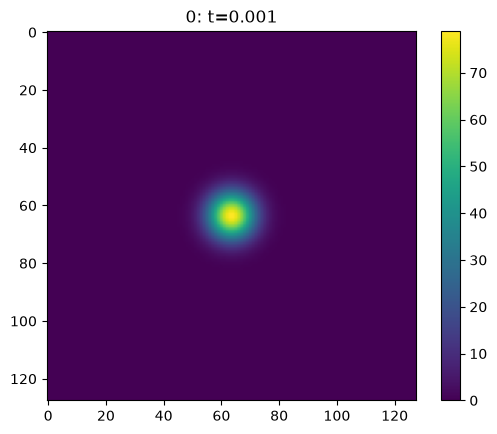
Step 0 : current/peak memory usage is 2.212646 12.367928 MB
<Figure size 640x480 with 0 Axes>
<Figure size 640x480 with 0 Axes>
<Figure size 640x480 with 0 Axes>
<Figure size 640x480 with 0 Axes>
<Figure size 640x480 with 0 Axes>
Step 10 : current/peak memory usage is 2.290767 12.367928 MB
<Figure size 640x480 with 0 Axes>
<Figure size 640x480 with 0 Axes>
<Figure size 640x480 with 0 Axes>
<Figure size 640x480 with 0 Axes>
<Figure size 640x480 with 0 Axes>
Step 20 : current/peak memory usage is 2.41265 12.367928 MB
<Figure size 640x480 with 0 Axes>
<Figure size 640x480 with 0 Axes>
<Figure size 640x480 with 0 Axes>
<Figure size 640x480 with 0 Axes>
<Figure size 640x480 with 0 Axes>
Step 30 : current/peak memory usage is 2.533546 12.367928 MB
<Figure size 640x480 with 0 Axes>
<Figure size 640x480 with 0 Axes>
<Figure size 640x480 with 0 Axes>
<Figure size 640x480 with 0 Axes>
<Figure size 640x480 with 0 Axes>
Step 40 : current/peak memory usage is 2.651902 12.367928 MB
<Figure size 640x480 with 0 Axes>
<Figure size 640x480 with 0 Axes>
<Figure size 640x480 with 0 Axes>
<Figure size 640x480 with 0 Axes>
<Figure size 640x480 with 0 Axes>
Step 50 : current/peak memory usage is 2.768882 12.367928 MB
<Figure size 640x480 with 0 Axes>
<Figure size 640x480 with 0 Axes>
<Figure size 640x480 with 0 Axes>
<Figure size 640x480 with 0 Axes>
<Figure size 640x480 with 0 Axes>
Step 60 : current/peak memory usage is 2.887513 12.367928 MB
<Figure size 640x480 with 0 Axes>
<Figure size 640x480 with 0 Axes>
<Figure size 640x480 with 0 Axes>
<Figure size 640x480 with 0 Axes>
<Figure size 640x480 with 0 Axes>
Step 70 : current/peak memory usage is 3.005444 12.367928 MB
<Figure size 640x480 with 0 Axes>
<Figure size 640x480 with 0 Axes>
<Figure size 640x480 with 0 Axes>
<Figure size 640x480 with 0 Axes>
<Figure size 640x480 with 0 Axes>
Step 80 : current/peak memory usage is 3.123477 12.367928 MB
<Figure size 640x480 with 0 Axes>
<Figure size 640x480 with 0 Axes>
<Figure size 640x480 with 0 Axes>
<Figure size 640x480 with 0 Axes>
<Figure size 640x480 with 0 Axes>
Step 90 : current/peak memory usage is 3.241372 12.367928 MB
<Figure size 640x480 with 0 Axes>
<Figure size 640x480 with 0 Axes>
<Figure size 640x480 with 0 Axes>
<Figure size 640x480 with 0 Axes>
<Figure size 640x480 with 0 Axes>
Step 100 : current/peak memory usage is 3.359299 12.367928 MB
<Figure size 640x480 with 0 Axes>
<Figure size 640x480 with 0 Axes>
<Figure size 640x480 with 0 Axes>
<Figure size 640x480 with 0 Axes>
<Figure size 640x480 with 0 Axes>
Step 110 : current/peak memory usage is 3.476667 12.367928 MB
<Figure size 640x480 with 0 Axes>
<Figure size 640x480 with 0 Axes>
<Figure size 640x480 with 0 Axes>
<Figure size 640x480 with 0 Axes>
<Figure size 640x480 with 0 Axes>
Step 120 : current/peak memory usage is 3.595809 12.367928 MB
<Figure size 640x480 with 0 Axes>
<Figure size 640x480 with 0 Axes>
<Figure size 640x480 with 0 Axes>
<Figure size 640x480 with 0 Axes>
<Figure size 640x480 with 0 Axes>
Step 130 : current/peak memory usage is 3.719383 12.367928 MB
<Figure size 640x480 with 0 Axes>
<Figure size 640x480 with 0 Axes>
<Figure size 640x480 with 0 Axes>
<Figure size 640x480 with 0 Axes>
<Figure size 640x480 with 0 Axes>
Step 140 : current/peak memory usage is 3.842542 12.367928 MB
<Figure size 640x480 with 0 Axes>
<Figure size 640x480 with 0 Axes>
<Figure size 640x480 with 0 Axes>
<Figure size 640x480 with 0 Axes>
<Figure size 640x480 with 0 Axes>
Step 150 : current/peak memory usage is 3.966033 12.367928 MB
<Figure size 640x480 with 0 Axes>
<Figure size 640x480 with 0 Axes>
<Figure size 640x480 with 0 Axes>
<Figure size 640x480 with 0 Axes>
<Figure size 640x480 with 0 Axes>
T range =  7.374417235632722e-06 7.286560064543426
delta range =  -0.0022616334982004526 0.0006078416564473385
<Figure size 640x480 with 0 Axes>
Compiling python#
Python can be slow because it is an interpreted rather than compiled language. As an example, let’s write our own implementation of matrix multiplication:
def matrix_multiply(A):
    n = np.shape(A)[0]
    B = np.zeros((n,n))
    for i in range(n):
        for j in range(n):
            for k in range(n):
                B[i,j] += A[i,k] * A[k,j]
    return B

n = 200
A = rng.normal(size = (n,n))

t_start = time.time()
B = matrix_multiply(A)
t_end = time.time()

print('Time taken = ', t_end-t_start)
print('GFLOPS = ', 2*n**3 / (t_end-t_start) / 1e9)
Time taken =  1.475280523300171
GFLOPS =  0.010845394992545785
One way to pre-compile python code is to use Cython. Let’s give it a try:
%load_ext Cython
%%cython
# Add the flag "-a" to the line above to turn on the output

# in class we went through the modifications below
# - using cdef to declare variable types
# - using the decorators to turn off bounds checking etc.
# Basically try to turn the yellow lines in the output to white and you
# should get a significant speed up

import numpy as np

cimport cython
@cython.boundscheck(False)
@cython.cdivision(True)
@cython.wraparound(False)
@cython.initializedcheck(False)

def matrix_multiply_cython(double[:,:] A, double[:,:] B):
    cdef int i,j,k
    cdef int n = A.shape[0]
    for i in range(n):
        for j in range(n):
            for k in range(n):
                B[i,j] += A[i,k] * A[k,j]
    return B
n = 10**3
A = rng.normal(size = (n,n))
B = np.zeros_like(A)

t_start = time.time()
matrix_multiply_cython(A,B)
t_end = time.time()

print('Time taken = ', t_end-t_start)
print('GFLOPS = ', 2*n**3 / (t_end-t_start) / 1e9)
Time taken =  0.6285772323608398
GFLOPS =  3.1817888034033723
Just in time (JIT) compilation using Numba:
import numba as nb

@nb.njit(parallel = True)
def matrix_multiply(A):
    n = np.shape(A)[0]
    B = np.zeros((n,n))
    # note the use of prange in the next line for parallel loops
    for i in nb.prange(n):
        for k in range(n):
            for j in range(n):
                B[i,j] += A[i,k] * A[k,j]
    return B

n = 10**3
A = rng.normal(size = (n,n))

t_start = time.time()
B = matrix_multiply(A)
t_end = time.time()

print('Time taken = ', t_end-t_start)
print('GFLOPS = ', 2*n**3 / (t_end-t_start) / 1e9)

t_start = time.time()
B = matrix_multiply(A)
t_end = time.time()

print('Time taken = ', t_end-t_start)
print('GFLOPS = ', 2*n**3 / (t_end-t_start) / 1e9)
Time taken =  0.7386212348937988
GFLOPS =  2.7077477677548303
Time taken =  0.04107236862182617
GFLOPS =  48.694537644395425
Setting parallel = True will use multiple cores with a significant speed up. It is also possible to use parallelism in Cython with OpenMP.
Other examples#
# Illustration of memory ordering
n = 10**4
A = rng.uniform(size = (n,n))
x = rng.uniform(size = n)

t_start = time.time()
for i in range(n):
    b = x * A[i,:]
t_end = time.time()

print('Time taken = ', t_end-t_start)

t_start = time.time()
for i in range(n):
    b = x * A[:,i]
t_end = time.time()

print('Time taken = ', t_end-t_start)
Time taken =  0.0325777530670166
Time taken =  0.0979616641998291
# Using built-in parallelization in scipy fft instead of numpy fft
n = 10**4
A = rng.uniform(size = (n,n))

t_start = time.time()
B = np.fft.fft(A)
t_end = time.time()
print('Time taken = ', t_end-t_start)

t_start = time.time()
B = scipy.fft.fft(A)
t_end = time.time()
print('Time taken = ', t_end-t_start)

t_start = time.time()
B = scipy.fft.fft(A, workers=8)
t_end = time.time()
print('Time taken = ', t_end-t_start)
Time taken = 0.5091831684112549
Time taken =  0.31032657623291016
Time taken =  0.15587425231933594
# Demonstration of memory leak because we took a slice:
from  psutil import Process
import numpy as np

print("memory before=",Process().memory_info().rss)
arr = np.arange(0, 100_000_000)
print("memory after declaring arr=", Process().memory_info().rss)
# without the np.copy on the next line we will get a memory leak!!
small_slice = np.copy(arr[:10])
# try instead:
#small_slice = arr[:10]
del arr
print("memory after deleting arr=",Process().memory_info().rss)
memory before= 3051900928
memory after declaring arr= 3851968512
memory after deleting arr= 3051966464
Further reading#
timeit() documentation which has details of how to call it directly from within your code or the command line.
Floating-Point Operations Per Second (FLOPS) for different architectures.
tracemalloc to profile memory usage
An interesting article on memory usage associated with NumPy slices and views